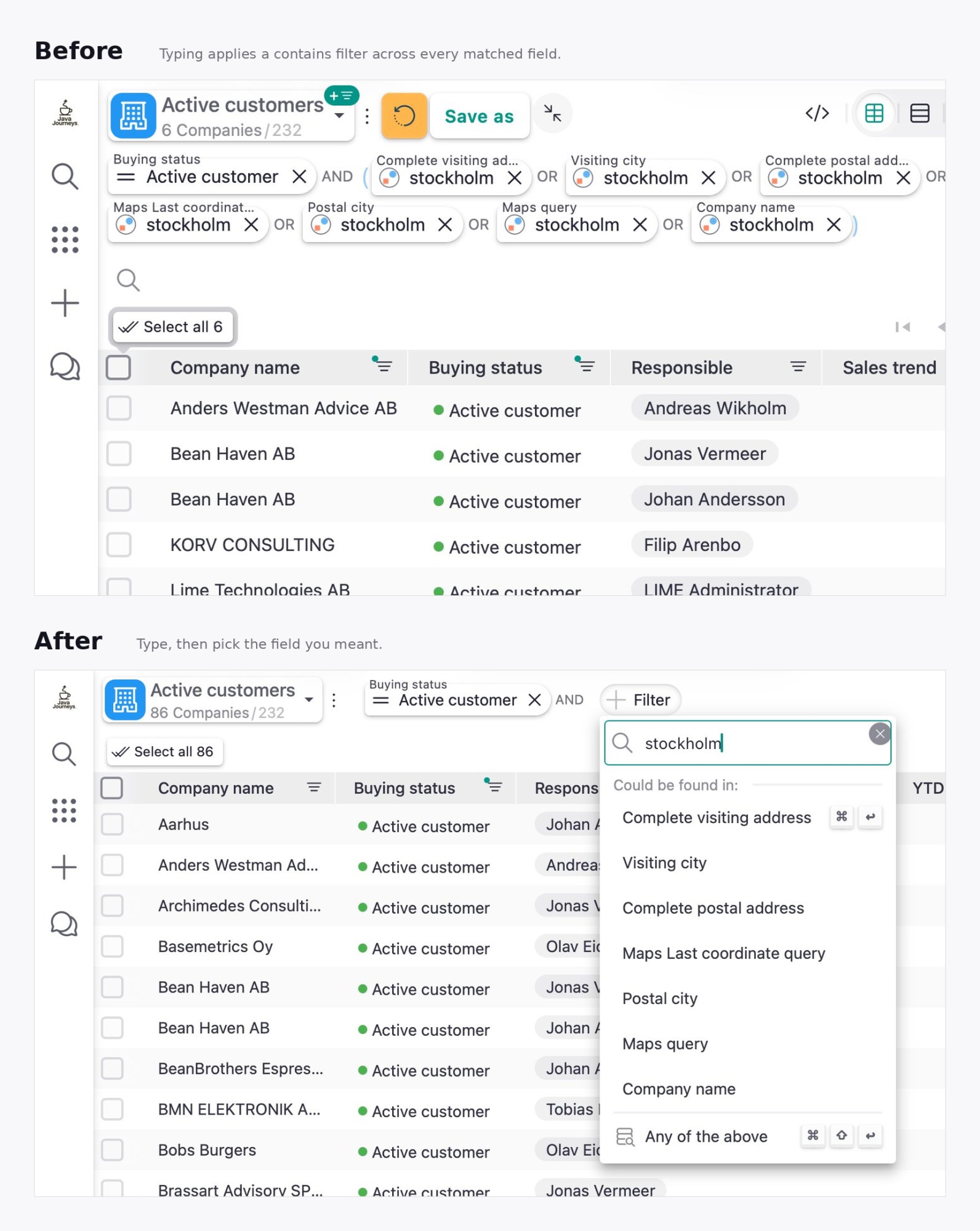
🎯A Better Way to Filter
What's different The search-looking field at the top of your views is now (or soon) a (+ Filter) button. Click it, type the keyword you have in mind — say, "stockholm" — and we'll show you the fields where that keyword was found. The results list stays open for you to select the field you meant, or pick several of them, or all. Filter gets applied, and updated with every selection you make. Why The old field looked like search but built filters. If that ever felt frustrating, the gap between how the field looked and what it did is exactly what we've fixed. In practice, it applied a filter across every field that contained a match — often including fields that aren't shown on cards or in tables. The result was a noisy filter that rarely matched what you actually wanted. The new flow lets you point at the field(s) you meant. What to expect Building a filter now takes one extra step: pick the field, a few fields, or all of them. We think the trade-off is worth it. The rows that remain on screen should be the rows you meant to see, and you should be in control of what's matched. If you want the old behavior — match across everything at once — Cmd/Ctrl + Shift + Enter still does it in one keystroke. Cmd/Ctrl + Enter picks the top suggestion. If you're used to the old field, this will feel different at first. Give it a day.